Mini Controll-
ers
Unlock/Lock Operation -
First Iteration
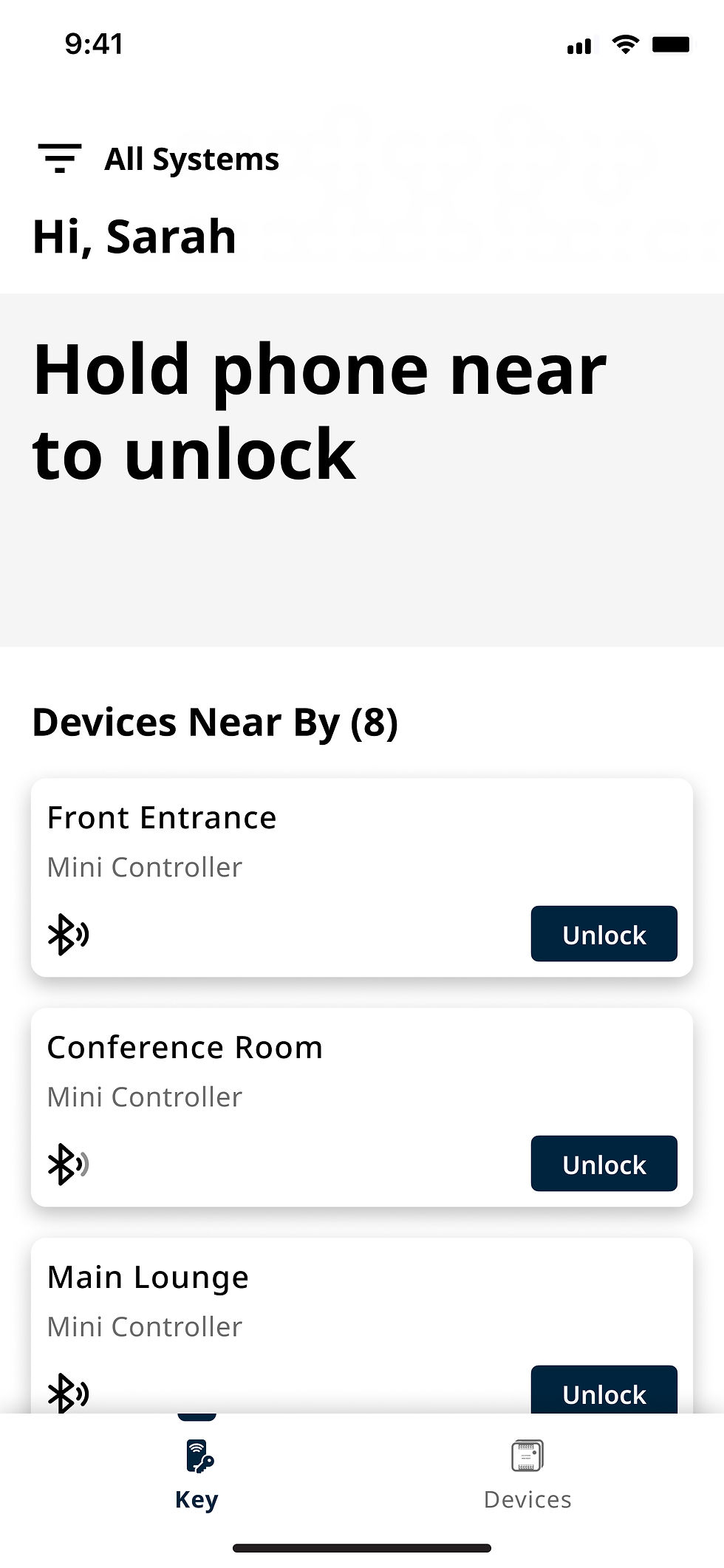
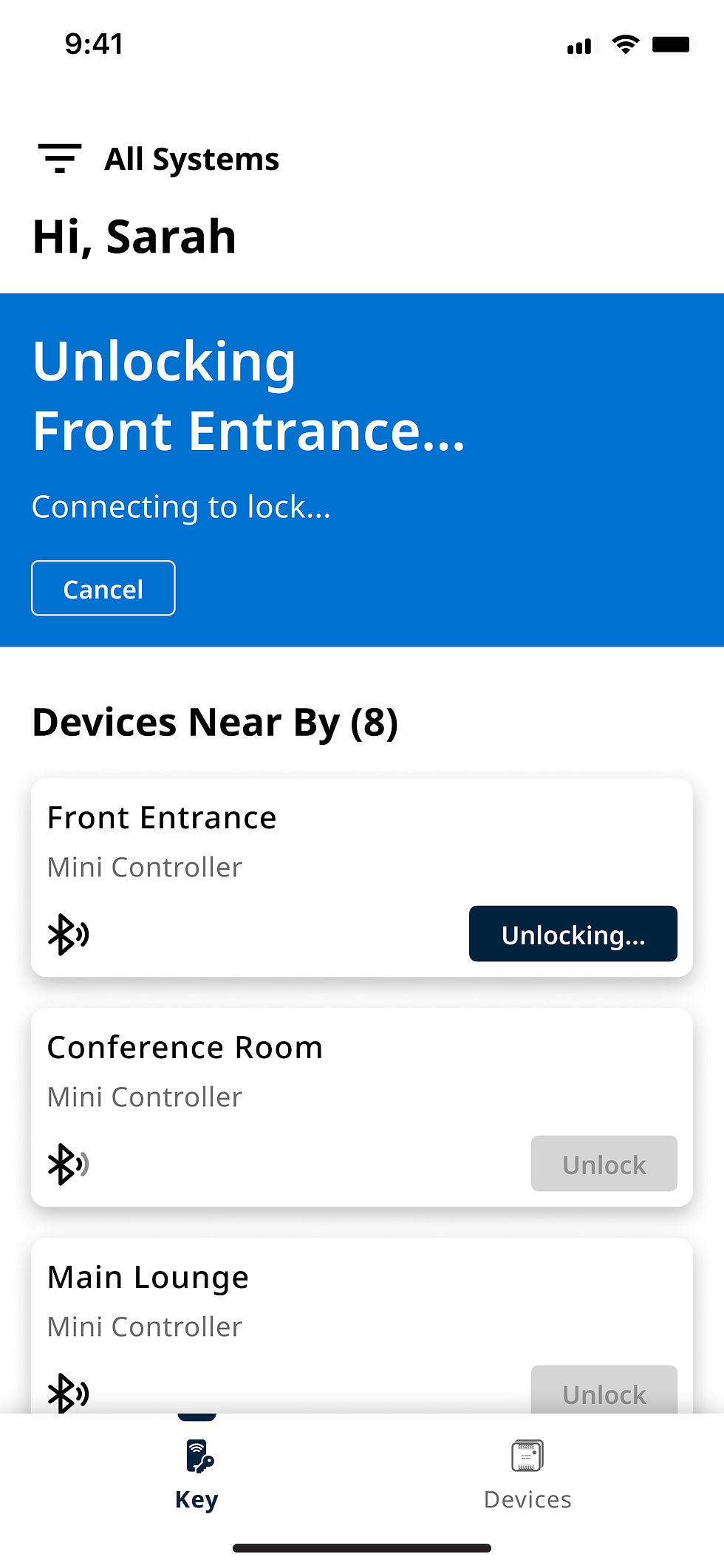
The initial unlock flow displayed connection and unlock status within a small inline section at the top of the screen while the device list remained visible. This allowed users to stay in the context of nearby devices during the interaction. However, development feedback highlighted that keeping the list active during the unlock process could introduce operational errors, and the limited status area made the system state less clear during connection.


Product/Platform: h.e.s Mini Controllers
My Role: Lead UI/UX Designer, Experience Strategy
Team: Engineering Manager, Product Manager, Business Analyst, Developers, UI/UX Designers, Architects, Software Testers
Year: 2025 - Present
Overview
Mini Controller is a lightweight access control solution that enables BLE mobile access and management without requiring a traditional card reader. Through the HES mobile app, users can securely control doors, gates, and other access points using their smartphones.
The product was commissioned to explore how HES could extend its existing hardware portfolio into new markets by integrating mobile access with conventional access control devices. By enabling mobile-first access without additional reader infrastructure, the solution opens opportunities across residential, DIY, multi-family, and small commercial environments.
Mini Controller also supports secure key storage through certified secure element hardware, flexible credential technologies, and cloud-based access management without requiring traditional enterprise access control panels.
Opportunity & Challenges
HES manufactures a wide range of access control hardware used across different markets, but many of these devices rely on traditional credential readers and lack mobile access capabilities.
Mini Controller explores a readerless mobile access approach, allowing existing devices to be controlled through BLE-enabled smartphones while supporting additional credential options when needed.
Designing the MVP required addressing several structural challenges:
-
Creating a simple mobile access experience for non-technical users
-
Supporting flexible credential types across different installation scenarios
-
Designing user and schedule management for smaller deployments
-
Enabling secure BLE communication between smartphones and hardware
-
Supporting devices such as gates, locks, door openers, and other contact-closure hardware
-
Ensuring the system could scale across different markets and use cases
The experience needed to balance simplicity for everyday users with flexibility for installers and administrators.
My Role
I lead the design of the Mini Controller MVP, focusing on the mobile workflows that enable device enrollment, access management, and everyday user interaction with the system.
My responsibilities included:
-
Defining the overall product experience for the MVP
-
Designing mobile workflows for device enrollment and access control
-
Structuring user and schedule management for installations supporting up to 200 users and 4 schedules
-
Collaborating with product and engineering to align the software experience with hardware capabilities and technical constraints
-
Designing scalable interaction patterns that could evolve as the product expands into additional markets
The goal was to deliver a simple but extensible mobile access experience that connects traditional access control hardware with modern
smartphone-based access.
Device Add & Device Details Page
The app scans the environment for devices within Bluetooth range, similar to the unlock/lock experience. Nearby devices are automatically discovered and displayed by device type and ID, allowing administrators to quickly identify and select a device to enroll.
Due to development resource constraints for the MVP, engineering requested that we reuse the existing Centrios device enrollment flow. This decision helped accelerate development and allowed the team to validate the core functionality before investing in a more tailored solution. As a result, exploration of alternative flows was intentionally limited at this stage.
Once a device is enrolled, users can access the device details page, which provides controls for device settings and visibility into event history.


Web Application
The Mini Controller web portal is designed exclusively for administrators, providing centralized management across the sites they oversee. Administrators can access multiple sites, update site settings, invite users, and manage user access from a single interface.
Device enrollment is intentionally limited to the mobile application, as adding devices requires physical proximity and Bluetooth connectivity to the hardware. As a result, devices cannot be added through the web portal.
Conversely, user management is handled through the web portal, allowing administrators to invite and manage users across sites—functionality that is not available within the mobile app. This separation ensures that each platform supports the tasks best suited to its capabilities: mobile for device interaction and web for administrative oversight.


Reflections
Designing Within Constraints
Building an MVP required balancing ideal solutions with technical and resource limitations. Many design decisions prioritized speed, feasibility, and validation over perfection.
Mobile and Web Serve Different Roles
The product separated responsibilities between platforms: mobile for device interaction and enrollment, and web for administrative management. This division ensured each platform focused on the tasks best suited to its capabilities.
Designing Without Device State Awareness
Because the lock state is unknown until a Bluetooth connection is established, the interface needed to communicate uncertainty clearly. The Unlock/Lock action and scanning feedback were designed to make the system behavior understandable despite this limitation.
Iteration Improves System Clarity
Early designs attempted to keep multiple interface elements visible during device interactions. Later iterations simplified the experience by focusing the screen on connection states, reducing potential operational errors and improving clarity during critical actions.
Designing Without a Fully Mature Design System
The evolving design system wasn’t prioritized, which limited large-scale UI transformation.
I had to balance progress with restraint — improving workflows without deepening visual and interaction inconsistencies. Constraint required discipline, not overreach.
Navigating a Dev-First Culture
In a development-led environment, design decisions were often challenged.
I reframed that resistance as a gap to bridge — educating teams through clear trade-offs and evidence-based reasoning. Influence came from clarity, not authority.
Unlock/Lock Operation -
Second Iteration
The second iteration introduced a full-screen interaction state to create a clearer and more controlled experience during the connection and unlock process. Because the device only determines the lock state after the phone connects via Bluetooth, the action was redesigned as “Unlock / Lock” to communicate that the button performs both operations.
A scanning animation was added to indicate the app searching for nearby devices and communicating Bluetooth signal strength. To prevent interruptions during the unlock flow, the device list was hidden while the interaction occurs, giving users a focused experience while still allowing them to open or close the list when needed.


